
IRCTC
Redesign

Project: IRCTC Experience Redesign Category: UX/UI Date: 2025 Geo: India
IRCTC is India’s primary railway booking platform, used by millions daily. Despite its scale, the experience often feels cluttered and stressful.
This project reimagines the pre-journey experience by simplifying navigation, reducing cognitive load, and creating a clearer booking flow.
The redesign introduces a clean interface, better hierarchy, and guided interactions making the experience faster and more intuitive.
The journey begins before boarding.
To understand the IRCTC experience, we evaluated the platform across multiple usability layers.
Testing focused on identifying friction in the booking journey.
Expert-Based Evaluation
User-Based Testing
Quantitative Analysis
Validation
Heuristic Evaluation
Cognitive Walkthrough
Task-based usability testing
Guerrilla testing
Survey insights
Time taken
Error frequency
UX Laws
A/B Testing
Iteration comparison
6 out of 7 users failed to complete booking.

Heuristic Evaluation
01 Visibility of system status
02 Match Between System and Real World
03 User control and freedom
04 Consistency and Standards
05 Error Prevention
06 Recognition Rather Than Recall
07 Flexibility & Efficiency of Use
08 Aesthetic and minimalist design
09 Help Users identify from Errors
10 Help and documentation
Principle Evaluation
Users struggle most with clarity, error recovery, and navigation consistency.

Heuristic Checklist
Unclear CTAs - Multiple buttons create confusion
Login disruption - Mid-flow login breaks journey
Poor error handling - No guidance for recovery
Cognitive overload - Excess information reduces clarity
Unexplained jargon - WL, RAC, 3A not defined
Inconsistent navigation - Layout changes across steps
Observations
Comparative Analysis
Comparative Analysis
Modern platforms simplify booking, while IRCTC directly exposes complexity to users.

Fitts Law
Problem - : The main function buttons of the site like the login/signup links and the train filter toggles are too small and positioned near the edges of the screen

Hicks Law
Problem - : The homepage and search form present a number of at once filters and options, from seat class to quotas, boarding points, and more.

Aesthetic Usability Effect
Problem - : The current IRCTC interface fails to follow the Aesthetic–Usability Effect. Despite being functionally rich, its cluttered visuals and inconsistent design elements make the booking experience feel complex.

6/7 users struggled to complete booking tasks
Patterns Observed
-
Cognitive overload - Too many options & data
-
Poor hierarchy - Important info not distinguishable
-
Hard-to-access actions - Small, poorly placed buttons
-
Lack of grouping - Information not chunked logically
-
Cluttered interface - No visual simplicity or spacing
-
Slow decision-making - Too many choices without guidance
-
Partial feedback works - Progress indicators help users
Cognitive overload and poor visual clarity are the biggest barriers in the IRCTC booking experience.
We split the booking journey into key subtasks and evaluated each step to identify usability breakdowns and friction points.

Cognitive Walkthrough
Patterns Observed
-
Mid-flow login disrupts booking journey
-
Cognitive overload during search & selection
-
Lack of clarity in train classes & jargon
-
Poor error handling during critical steps
-
No structured flow across booking stages
Across all personas, users struggled with clarity, navigation, and error handling.
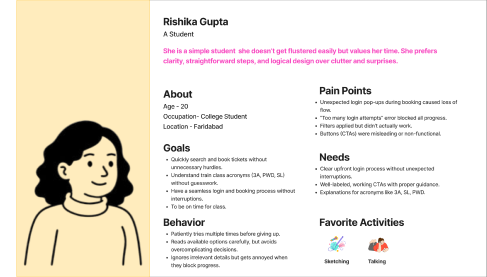


Cognitive Walkthrough
Information Architecture
Information
Architecture

We simplified journeys, not just screens.
Home Page

-
Cluttered navigation, too many CTAs
-
No clear primary action
-
Cognitive overload (filters & info overload)

Single clear CTA
Clean, structured layout
Reduced visual clutter
1
2
Booking Page


-
Overloaded results, no hierarchy
-
Classes (WL, RAC) unclear
-
Repetitive & confusing filters

Clean, scannable train list
Explained classes & visible pricing
Single, effective filter system


Register Page

-
Lengthy & confusing process
-
Poor error messages (captcha issues)
-
No guidance - high drop-off
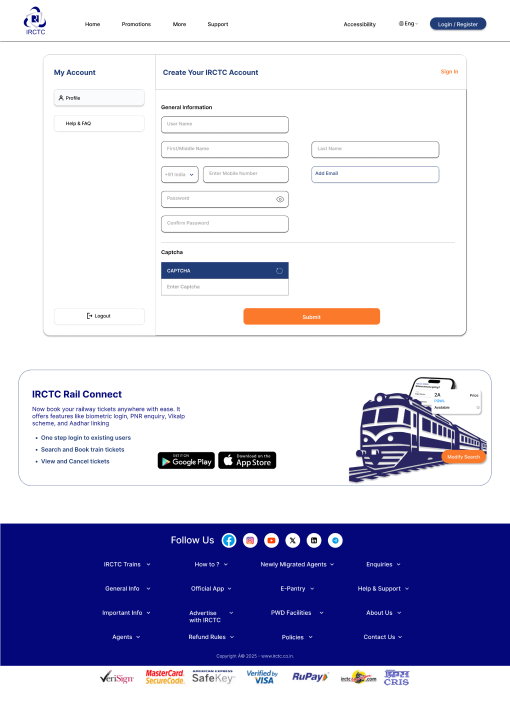
Optional quick login/logout
Simplified, step-based form
3
Clear error feedback
PNR Status Page

-
Hard to locate, low visibility
-
Poor hierarchy of status info
-
No clear guidance for next step
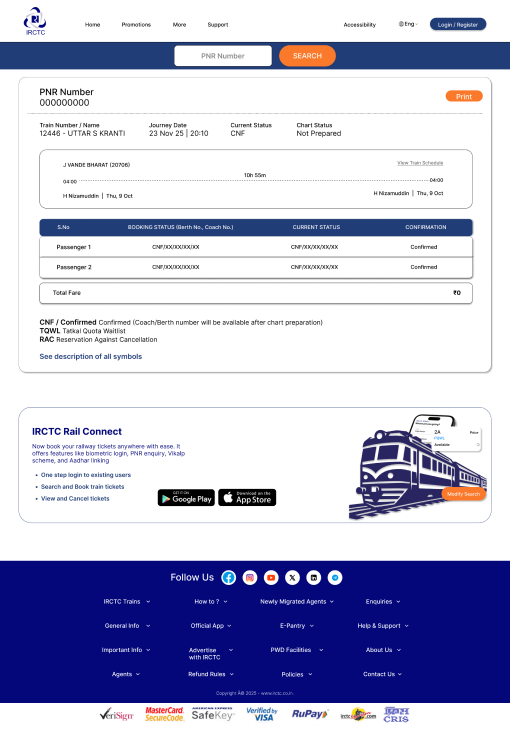
Actionable next steps
Explained classes
Easily accessible & highlighted
4
Clear status hierarchy
5
Payment Page
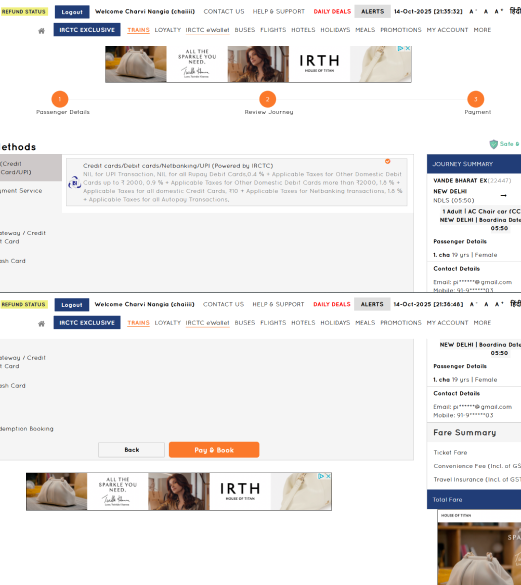
-
Poor error handling
-
No clear feedback on actions
-
High failure confusion


-
Clear payment feedback
-
Error guidance & recovery
-
Smooth, trustworthy flow
6
Passenger Page
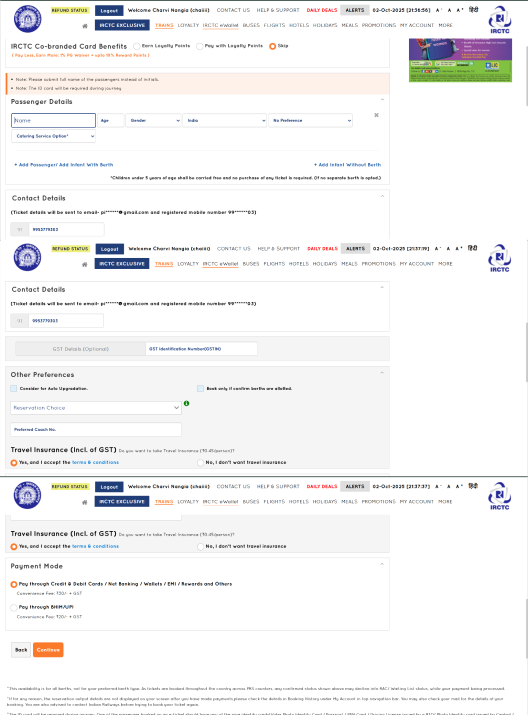
-
Too many fields, no grouping
-
No clarity on passenger limit
-
Manual, repetitive input

Clear limits & guidance
Grouped, structured form
Login Page

-
Mandatory login interrupts booking flow
-
Captcha unclear - repeated failures
-
Poor error messages, no guidance
-
Hard to locate login / confusing placement

-
Optional / upfront login
-
Simplified login (OTP / social login)
-
Clear, helpful error messages
-
Clean, visible login entry point
7
Observations
How Did Users Respond?
We tested our redesign by comparing it with the original experience to understand improvements in usability and user confidence.
Overall Response
-
Users found the experience clearer and easier to navigate
-
Booking flow felt more structured and guided
-
Reduced confusion compared to earlier experience
What Improved
-
Clear CTAs - Users knew exactly where to click
-
Simplified flow - Less steps, smoother journey
-
Better hierarchy - Easier to scan information
-
Reduced clutter - Lower cognitive load
-
Guided interactions - Less trial and error
Simplifying structure and improving clarity significantly reduced friction in the booking journey.
Observed Behavior
-
Users completed tasks with more confidence
-
Fewer interruptions during booking
-
Less hesitation while selecting options
User Feedback
-
“This feels much easier to use”
-
“Now I know what to do next”
-
“Less confusing than before”
